- VMware Technology Network
- :
- Cloud & SDDC
- :
- ESXi
- :
- ESXi Discussions
- :
- Re: ESX4 + Nehalem Host + vMMU = Broken TPS !
- Subscribe to RSS Feed
- Mark Topic as New
- Mark Topic as Read
- Float this Topic for Current User
- Bookmark
- Subscribe
- Mute
- Printer Friendly Page


- Mark as New
- Bookmark
- Subscribe
- Mute
- Subscribe to RSS Feed
- Permalink
- Report Inappropriate Content
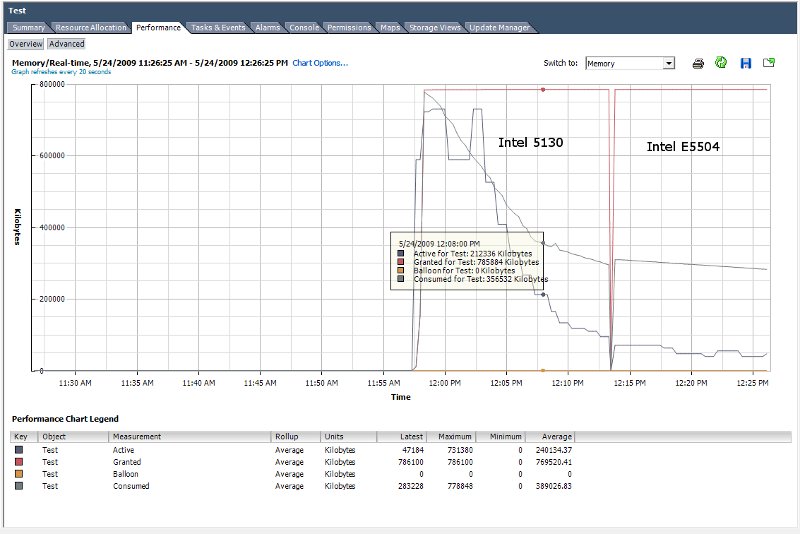
Since upgrading our 2 host lab environment from 3.5 to 4.0 we are seeing poor Transparent Page Sharing performance on our new Nehalem based HP ML350 G6 host.
Host A : ML350 G6 - 1 x Intel E5504, 18GB RAM
Host B : Whitebox - 2 x Intel 5130, 8GB RAM
Under ESX 3.5 TPS worked correctly on both hosts, but on ESX 4.0 only the older Intel 5130 based host appears to be able to scavenge inactive memory from the VMs.
To test this out I created a new VM from an existing Win2k3 system disk. (Just to ensure it wasn't an old option in the .vmx file that was causing the issue.) The VM was configured as hardware type 7 and was installed with the latest tools from the 4.0 release.
During the test the VM was idle and reporting only 156MB of the 768MB as in use. The VM was vmotioned between the two hosts and as can be seen from the attached performance graph there is a very big difference in active memory usage.
I've also come across an article by Duncan Epping at yellow-bricks.com that may point the cause as being vMMU...
If vMMU is turned off in the VM settings and the VM restarted then TPS operates as expected on both hosts. (See second image)
So if it comes down to chosing between the two, would you choose TPU over vMMU or vice versa?

- Mark as New
- Bookmark
- Subscribe
- Mute
- Subscribe to RSS Feed
- Permalink
- Report Inappropriate Content
The patch has been made available. I'm deploying as we speak :smileyblush:
- Mark as New
- Bookmark
- Subscribe
- Mute
- Subscribe to RSS Feed
- Permalink
- Report Inappropriate Content
Where did you find the patch?

- Mark as New
- Bookmark
- Subscribe
- Mute
- Subscribe to RSS Feed
- Permalink
- Report Inappropriate Content
- Mark as New
- Bookmark
- Subscribe
- Mute
- Subscribe to RSS Feed
- Permalink
- Report Inappropriate Content
I got it through update manager, but above is indeed the article. I can also tell you, it is working as expected. The vm's started on the patched host (we have patched one so far), are nicely calming their active memory to expected values (in our case 25-40 % instead of 98 %)
- Mark as New
- Bookmark
- Subscribe
- Mute
- Subscribe to RSS Feed
- Permalink
- Report Inappropriate Content
Just chiming in --
I just finished updating my 3 hosts (using esxupdate) with all 3 of the patch bundles that have been released since June. All 3 are back up and running hosting VMs again. It only took a couple of minutes before the memory utilization on all VMs on patched hosts dropped from 92-98% to an average of 5-20% (perhaps I'm giving out too much memory!). I've still got a lot of "warnings" on my VMs -- but I likely just haven't waited long enough for them to clear. It appears the patch really does work.
Now if only they'll release the update to allow full guest USB pass-through, I'll be a happy camper...
- Mark as New
- Bookmark
- Subscribe
- Mute
- Subscribe to RSS Feed
- Permalink
- Report Inappropriate Content
Alright --
It's the next morning. All of my VMs are still reading low memory utilization as is "normal", however I've still got memory alarms that wont clear themselves.
I've attempted to restart the VC services, and went as far as to reboot the entire VirtualCenter server - but the alarms still wont go away. There's even one alarm on a host left over from last night citing "Battery on Controller 0 -- Charging". This happens every time I reboot the host, however normally goes away after a few minutes. I've updated the hardware, the actual battery has no alarm on it anymore - but there's still that yellow alert next to the host.
Any ideas on how to clear all of these old alerts?

- Mark as New
- Bookmark
- Subscribe
- Mute
- Subscribe to RSS Feed
- Permalink
- Report Inappropriate Content
I have also the problem with old alarms pending. I go to the Top-Level in Vcenter, klick "Alarms" and than "Definitions". Edit one of the definitions (don't change anything) and then save it. After this the old alarms was gone in my environment. Try it - Good Luck, Paul
- Mark as New
- Bookmark
- Subscribe
- Mute
- Subscribe to RSS Feed
- Permalink
- Report Inappropriate Content
Thank you, Paul1!
All alarms cleared themselves after I edited the alarm. This is now the first time I've seen my VM environment completely free of errors. It's great! How exciting....

- Mark as New
- Bookmark
- Subscribe
- Mute
- Subscribe to RSS Feed
- Permalink
- Report Inappropriate Content
@ Paul1 thanks for posting this sollution. I installed the patch from KB 1012514 and "changed" the VM Memory alarm setting. Now everything seems to be normal again. 
- Mark as New
- Bookmark
- Subscribe
- Mute
- Subscribe to RSS Feed
- Permalink
- Report Inappropriate Content
So i hate to open old wounds but here we go;
I have some new Westmere processor Dell machines (these are same gen as the Nehalem), i am having the same memory reporting issues. when i check for patch 200909401 i have under "compliance" "Obsoleted by host". My question is should i force this patch to my hosts or am i missing something else?

- Mark as New
- Bookmark
- Subscribe
- Mute
- Subscribe to RSS Feed
- Permalink
- Report Inappropriate Content
We experienced the same issue in our prodcution and we made the changes through the advanced option of just disabling LPS. Any idea on that fix ETA?
Cheers,
Chad King
VCP-410 | Server+
"If you find this post helpful in anyway please award points as necessary"
- Mark as New
- Bookmark
- Subscribe
- Mute
- Subscribe to RSS Feed
- Permalink
- Report Inappropriate Content
With ESX 4 U2 and Dell Nehalum, I still see this problem. I have changed Mem.AllocGuestLargePage to a 0 in advance settings and 24 hours later the memory is still jacked up. Is there another place to disable this for the time being?
- Mark as New
- Bookmark
- Subscribe
- Mute
- Subscribe to RSS Feed
- Permalink
- Report Inappropriate Content
Keep in mind you have to vmotion your VM's off the host and back onto it.. did you do that after making the changes?
CJK
- Mark as New
- Bookmark
- Subscribe
- Mute
- Subscribe to RSS Feed
- Permalink
- Report Inappropriate Content
thanks
- Mark as New
- Bookmark
- Subscribe
- Mute
- Subscribe to RSS Feed
- Permalink
- Report Inappropriate Content
I hate to drag up an old thread, but I'm still getting this error on a new IBM X3650M3. I've patched the server to the latest patch level of ESXi using update manager. I'm now on ESXi 4.0.0, 228255. I'd imagined that this problem would have been fixed with the later versions of ESXi, but apparently not. I've obvioously tried the "mem.allocguestlargepage" change, to no avail, this is with full reboots of the host server just to be on the safe side.
I've nothing else to try that I know of, any suggeestions of the guru's on here? 
Cheers
- Mark as New
- Bookmark
- Subscribe
- Mute
- Subscribe to RSS Feed
- Permalink
- Report Inappropriate Content
What about esxi 4.1 and vMMU and TPS?
Is it recommend to force vMMU on Terminal Servers?

- Mark as New
- Bookmark
- Subscribe
- Mute
- Subscribe to RSS Feed
- Permalink
- Report Inappropriate Content
I think, based on what I've seen so far that this problem still exists in ESXi 4.1
- Mark as New
- Bookmark
- Subscribe
- Mute
- Subscribe to RSS Feed
- Permalink
- Report Inappropriate Content
Agreed. We have several installations on ESXi 4 and 4.1 and see this issue.
- Mark as New
- Bookmark
- Subscribe
- Mute
- Subscribe to RSS Feed
- Permalink
- Report Inappropriate Content
I can also confirm that turning off the large page support on all hosts and then vMotioning VMs does indeed kick TPS back into life.
This quickly begins to save gigabytes of RAM on ESXi4.1


- Mark as New
- Bookmark
- Subscribe
- Mute
- Subscribe to RSS Feed
- Permalink
- Report Inappropriate Content
For those interested - there's a recent blogpost which explains the postion from VMware...
http://blogs.vmware.com/uptime/2011/01/new-hardware-can-affect-tps.html
Regards
Mike
Michelle Laverick
@m_laverick
http://www.michellelaverick.com